
Yes, a browser agent like Claude in Chrome can run LinkedIn for you: open profiles, send requests, type messages. That is enough for a test. A running campaign needs almost everything the agent does not bring: a schedule, daily limits, conditions, and a stop when someone replies. You build and maintain those yourself. As of October 2026.
What AI browser agents can do in October 2026
A browser agent is a language model that operates your browser. You describe a task in plain language, the agent looks at the page, clicks, types, and decides the next step on its own. That is the real strength: no code, no setup, no new tool. You can try an idea in five minutes.
Claude in Chrome (Anthropic)
Anthropic describes Claude in Chrome as a “browser extension that allows Claude to read, click, and navigate websites alongside you.” According to the help page it is available on all paid plans (Pro, Max, Team, and Enterprise), in beta in the Chrome side panel. Control runs through the Chrome “debugger” permission, which Anthropic says lets Claude click, type, and take screenshots. Tabs Claude opens go into a separate colored tab group so you can tell them apart from your own. Source: Get started with Claude in Chrome, accessed October 5, 2026.
Pricing per the Anthropic pricing page: Pro is $20 per month billed monthly or $17 per month billed annually ($200 up front), Max starts at $100 per month. Tax is extra, and every plan says “Usage limits apply.” As of October 2026. Developers also get Computer Use through the API, which per the Anthropic docs gives Claude “screenshot, mouse, and keyboard control of a desktop environment.”
ChatGPT agent and Atlas (OpenAI)
OpenAI's lineup just changed. The agent mode help page now reads: “ChatGPT agent is no longer available.” It points to ChatGPT Work and a cloud browser in ChatGPT. The ChatGPT Atlas browser, introduced in October 2025, has “since been deprecated,” according to OpenAI. We could not load the pages for the successor, so we do not list its features or prices. Sources: OpenAI Help: ChatGPT agent and Introducing ChatGPT Atlas, read in archived copies from October 3 and September 29, 2026, because OpenAI blocks direct requests.
What the DIY setup for LinkedIn looks like
The typical DIY setup is a prompt you restart every day. Something like this:
Open my saved LinkedIn search [link to search]. Visit the first [number] profiles that are not connections yet. Send each one a connection request with this note: “Hi [first name], I also work in [topic] and would like to connect.” Skip profiles without a photo. Log the names in [document].
That works as long as you sit next to it. The question is what happens in week three.
The maintenance cost: where DIY eats your time
Every run plays out differently
A language model decides on every run which button is meant, which profile fits, and when the task is done. The same prompt does not reliably produce the same clicks. Sometimes the agent skips a profile, sometimes it sends the note without a first name, sometimes it stops halfway. You only notice if you count.
The agent works one screenshot at a time
Anthropic writes: “To see a page and decide what to do next, Claude takes screenshots of the tabs it's working in.” Every step is screenshot, evaluation, click, next screenshot. That takes time and draws on your plan's usage. If LinkedIn changes a button, a dialog, or the order of steps, your prompt has to cope with it. Source: Using Claude in Chrome safely, accessed October 5, 2026.
You stay the supervisor
In the side panel, Claude in Chrome starts in “Automatically approve” mode, per Anthropic: Claude works continuously, reviews each action, and “pauses to ask you when something needs your approval.” That is good safety design. For a campaign it means someone has to be around when the agent asks. And someone has to keep the list of who was invited, who accepted, and who replied. Source: Get started with Claude in Chrome.
The tool changes under you
Between October 2025 and October 2026, OpenAI launched an agent mode and its own browser and retired both. Anyone who built an outreach routine on top of them is rebuilding it now. That is not a criticism of OpenAI. New product categories move fast. For a process that should run every workday, it is a cost you have to plan for.
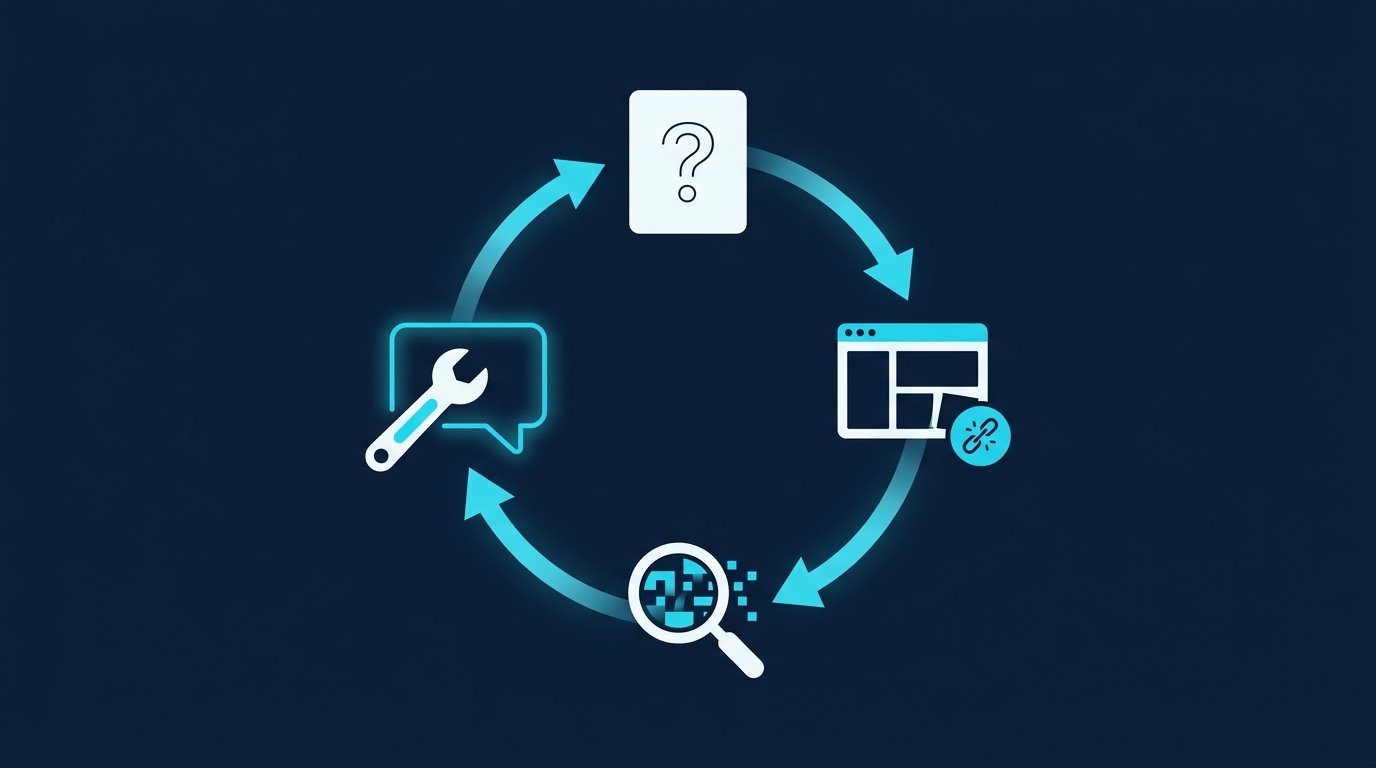
What DIY is missing: AI agent setup vs. CompLeadly
An agent can click. A campaign needs building blocks that outlast a single run. The table shows who provides them.
Building block | DIY with an AI agent | CompLeadly |
|---|---|---|
Audience | search link in the prompt, you track progress in your own list | a LinkedIn or Sales Navigator search becomes a saved audience |
Schedule | Anthropic lists scheduled tasks for Pro; you set and check weekdays and hours for LinkedIn yourself | Schedule workflow calendar with weekdays, start and stop time (Basic and up) |
Daily limit per step | a number in the prompt, you check whether it holds | its own daily value for every workflow step |
Conditions | described in words, outcome varies per run | blocks for Connection accepted and Replied |
Follow-ups that stop on reply | you check who replied before every run | a follow-up is skipped when the last message came from the contact |
Withdraw pending requests | separate prompt, separate list | a workflow step and a standalone feature |
Inbox | LinkedIn messaging as usual | Smart Chat with categories and notes (add-on) |
Statistics | a spreadsheet you maintain | dashboard with acceptance rate and a statistics page |
Pauses between actions | depends on how fast the model responds | random delays and breaks after a random number of actions |
The difference is not the clicking. It is who remembers what happened yesterday.
Security, part 1: what an agent can do in your LinkedIn session
A browser agent works in your browser, which means with your LinkedIn login. Whatever you can click there, it can click: send messages, remove connections, edit your profile. That is by design, otherwise it could not do the job. It has two consequences that the vendors describe themselves.
Prompt injection through profiles and messages
Anthropic writes: “The biggest risk facing browser-using AI tools is prompt injection attacks where malicious instructions hidden in web content (websites, emails, documents) could trick Claude into taking unintended actions.” On LinkedIn the agent constantly reads text written by strangers: About sections, posts, messages. Anthropic reports an attack success rate below 0.08 percent for its current configuration in internal testing and adds: “the chances of an attack are still non-zero.” OpenAI also flagged “prompt injection” for its retired agent mode. Sources: Using Claude in Chrome safely, accessed October 5, 2026, and OpenAI Help: ChatGPT agent, archived October 3, 2026.
What is on screen goes to the vendor
Per Anthropic, screenshots become part of the conversation: “Whatever is visible in one of those tabs is captured in the screenshots and becomes part of the conversation.” Claude cannot filter sensitive content out, so Anthropic recommends not using the extension on sensitive sites and using a separate browser profile without access to sensitive accounts. Your LinkedIn inbox holds conversations with other people. The page does not say where the screenshots are processed. Source: Using Claude in Chrome safely. For Computer Use, Anthropic likewise advises isolating Claude from sensitive data and actions (docs).

Security, part 2: what LinkedIn checks in your browser
An independent code analysis on GitHub examined LinkedIn's web client code as served on May 2, 2026. According to linkedin-spyware-analysis, it contains a list of 6,222 Chrome extension IDs. For each one, the page requests a file under “chrome-extension://”. That only succeeds if the extension is installed and exposes the file. Hits are sent to LinkedIn as an event, per the analysis. A second method scans the page for traces of extensions and also finds ones that are not on the list. A browser fingerprint is collected on top. We have not checked for a statement from LinkedIn.
What does that mean for AI agents? Claude in Chrome is a Chrome extension. Its ID, taken from the store link in Anthropic's help page, is not on the May list. We have not checked whether the extension leaves traces on LinkedIn pages. What is documented: LinkedIn checks in the browser which extensions are running, and the list changes with every update of its code. If you let an extension work inside your LinkedIn session, you should know that.
Test it yourself: how visible is your AI agent?
What can a website actually see of an AI agent? We measured it ourselves in October 2026, using Chrome on macOS. We tested Claude in Chrome, Codex for Chrome, and Claude Code with the Playwright MCP, plus human runs, including with autofill and with developer tools open. The results of our own test:
- Every agent run triggered at least three hard signals. Not a single human run triggered even one.
- Visible extra elements. Claude in Chrome injects its own elements into every page it operates: a glowing border, a stop button, a second mouse cursor. Codex for Chrome places its own overlay on the page. A website can read these elements.
- Typing by script. The extensions fill fields by script. Those inputs lack the marker the browser attaches to real keystrokes.
- Clicks dead center. With Claude in Chrome and Codex for Chrome, clicks landed within less than one pixel of the button's center. Humans landed 3 to 190 pixels off.
- No pause between fields. Agents moved from one field to the next in 2 to 18 milliseconds, humans took at least 1.1 seconds.
To put this in context: the measurement shows what any website can technically see. It does not show which checks LinkedIn actually runs.
Try it with your own agent. On our AI agent self-test page you copy a task, hand it to your agent, and it fills out a test form. The page shows you live which signals it measured. Your form values never leave your browser.
The alternative: set it up once, then run on a schedule
CompLeadly is a desktop app. Workflows run on your own computer, and without a configured proxy they go through your own internet connection. Instead of restarting a prompt every day, you build a workflow once:
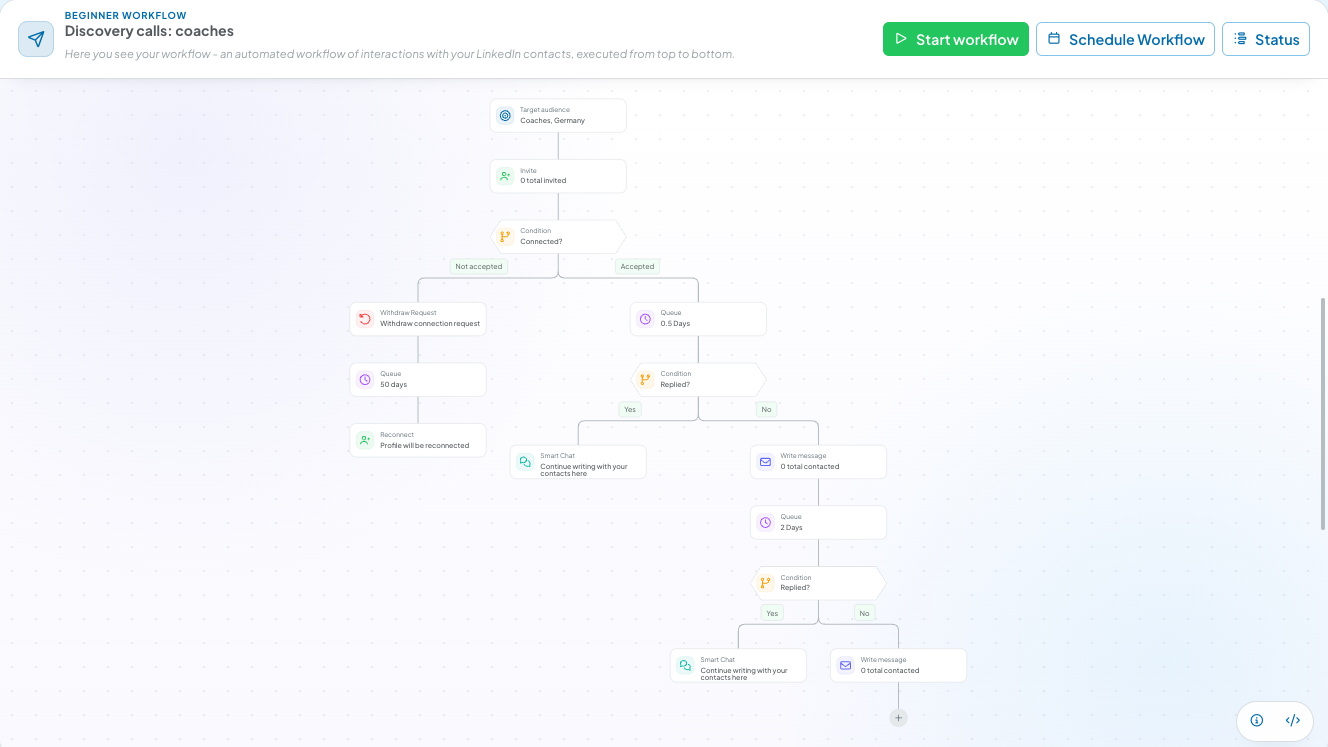
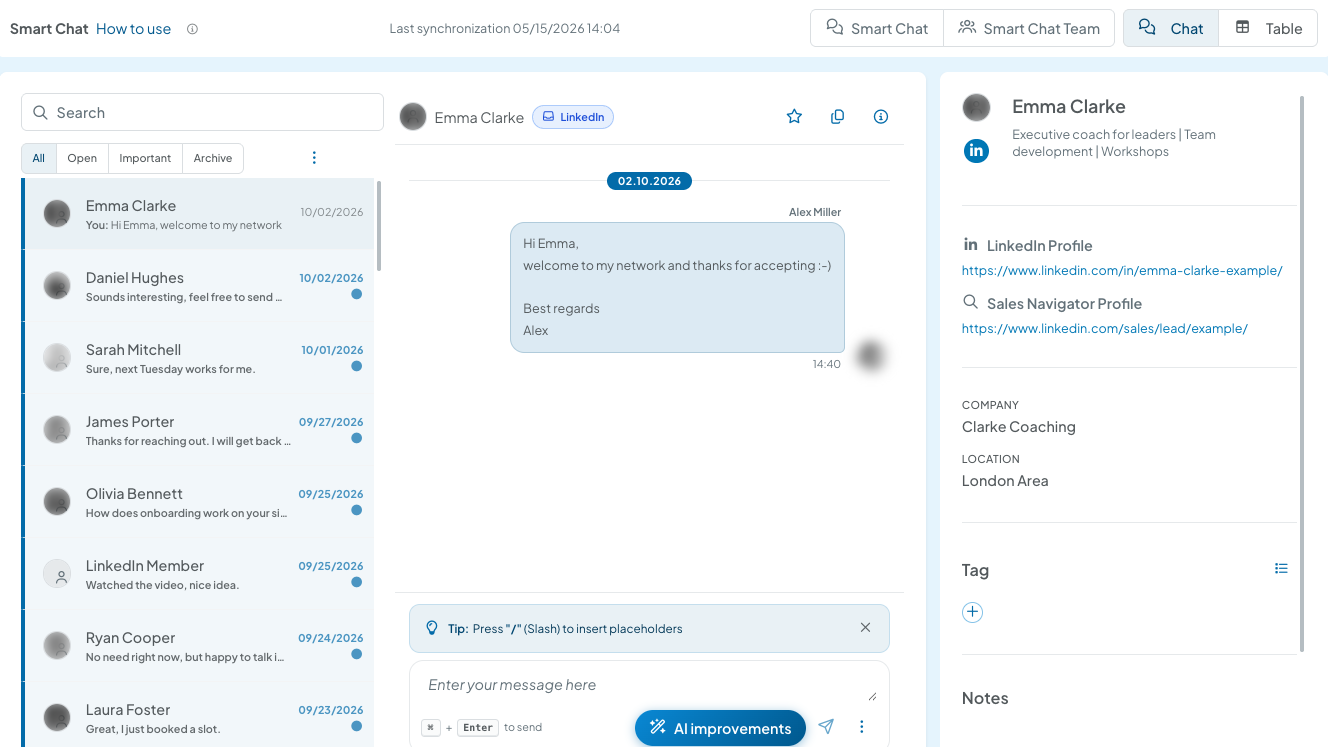
- Branches instead of hope. After the connection request, the Connection accepted block decides what happens next. Not accepted: withdraw the request, wait, reconnect later. Accepted: write a message, then check Replied. Anyone who replies lands in Smart Chat, everyone else gets the next follow-up.
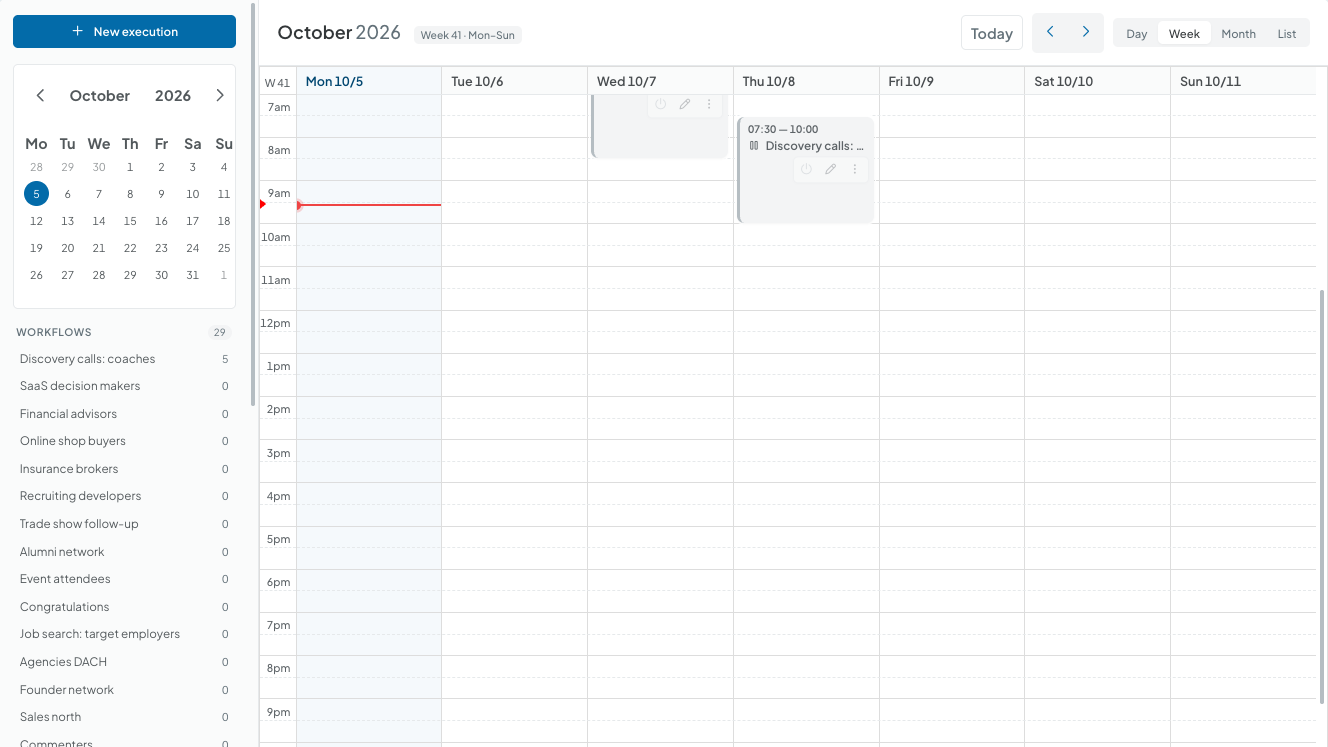
- A calendar instead of constant supervision. In the Schedule workflow calendar you set weekdays, start and stop time. Full workflows and schedules come with Basic and up.
- A daily value per step. Every step has its own daily limit, connecting defaults to 2 per day. When LinkedIn reports the weekly limit, CompLeadly pauses the feature automatically. More in LinkedIn connections limit.
- Pauses like a normal workday. Clicks come with random delays, and after a random number of profile visits the app takes a longer break.
- You keep the conversations. Follow-ups skip contacts whose last message was to you. You handle the replies yourself, in Smart Chat if you like (add-on).
That leaves maintenance. When something changes on LinkedIn, the CompLeadly team updates the app, not you your prompt. The changelog shows how often that happens: 14 entries for new versions in September 2026 alone. More on the topic is on our Security page. For an overview of German vendors see LinkedIn automation vendors, and for CompLeadly in sales see CompLeadly as an outreach assistant.
What if you still want to use Claude or ChatGPT?
Then let the AI talk to CompLeadly instead of remote-controlling your browser. Through the MCP connector, your AI can access leads, audiences, workflows, schedules, and statistics in CompLeadly. Setup guides: Connect Claude with CompLeadly and Set up ChatGPT access. The AI asks how the campaign did this week. The clicks on LinkedIn stay with the workflow.
Sales, recruiting, job search: who gets what
Sales
A Sales Navigator or LinkedIn search becomes your audience. The workflow visits, connects, sends the first message after acceptance, and follows up until someone replies. You see the acceptance rate on the dashboard, not in a spreadsheet you maintain.
Recruiting
Recruiter Lite searches, pipelines, and saved searches work as audiences, with your own Recruiter license. Each open role gets its own workflow with profile visit, connection, opener, and follow-ups, on a schedule. More on CompLeadly for recruiters.
Job seekers
A people search for recruiters and hiring managers at your target employer becomes your audience. Profile visit, connection with a note, opener, and follow-up already run in the free version, with daily limits of 2 connection requests, 25 profile visits, and 1 follow-up. To get your profile ready, read Open to Work on LinkedIn.
When an AI agent is still the right call
For one-off tasks a browser agent is strong: summarize a profile before a meeting, compare ten company pages, do research you would otherwise click through by hand. Flexibility matters there, and you spot mistakes right away. For a campaign that should run on plan every workday, you pay for that flexibility with supervision and upkeep. To see how clearly a website can spot your own agent, run the AI agent self-test.
You start CompLeadly with a 10-day free trial with all features and no credit card. After that, your access switches automatically to the free version with core features and daily limits. Plans and prices are on the pricing page.
Frequently asked questions: ChatGPT and Claude for LinkedIn automation
Can Claude automate LinkedIn?
With Claude in Chrome, Claude can read, click, and navigate in your browser, LinkedIn included. Anthropic offers the extension on all paid plans. You still have to organize the schedule, daily limits per step, conditions, and statistics yourself. As of October 2026.
Is ChatGPT agent mode still available?
No. Per OpenAI Help, ChatGPT agent is no longer available, and OpenAI points to ChatGPT Work and a cloud browser. The ChatGPT Atlas browser has also been deprecated, according to OpenAI. As of October 2026.
How much does Claude in Chrome cost?
Claude in Chrome is part of the paid Claude plans. Per Anthropic, Pro is $20 per month or $17 per month billed annually, Max starts at $100 per month, plus tax and with usage limits. As of October 2026.
What is prompt injection for AI agents?
Prompt injection means text on a web page, in an email, or in a document carries hidden instructions that push the agent into unintended actions. Anthropic calls it the biggest risk for AI in the browser. On LinkedIn, an agent constantly reads text written by strangers, such as profiles and messages.
Does LinkedIn check which browser extensions are installed?
According to an independent code analysis on GitHub, LinkedIn's web client code in May 2026 contained a list of 6,222 Chrome extension IDs that the browser checks, plus a scan of the page for extension traces. We have not checked for a statement from LinkedIn.
Can I connect ChatGPT or Claude to CompLeadly?
Yes, through the MCP connector. Your AI then accesses leads, audiences, workflows, schedules, and statistics in CompLeadly instead of remote-controlling your browser. The setup guides are in the knowledge base under Connect Claude with CompLeadly and Set up ChatGPT access.